Finitomy - Spend Manager1.2.1
Publisher Description


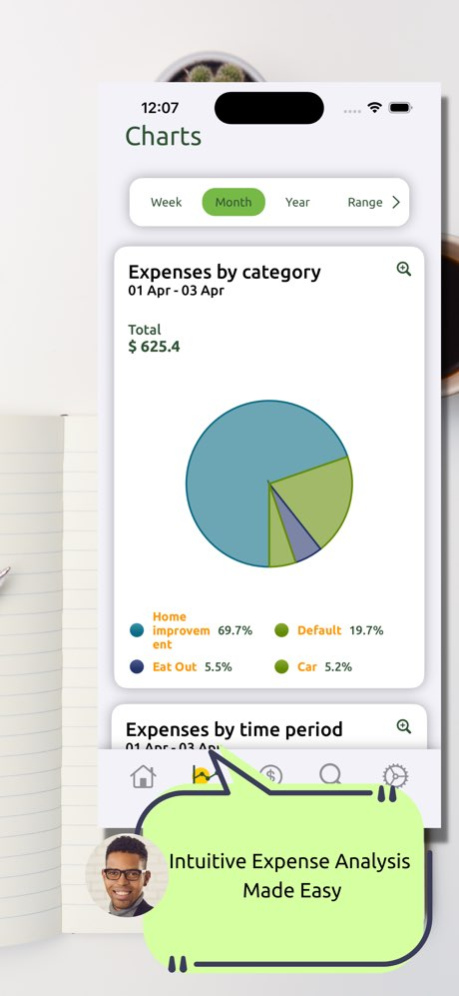

Finitomy is the ultimate solution for keeping track of your expenses. With Finitomy, you can easily add your expenses, set their dates, and modify them with returns. You can create categories and tags for your expenses, making it easier to organize and analyze your spending. Finitomy also lets you take photos of your receipts and search inside them for even greater detail.
The app features a powerful search function that allows you to customize your search parameters and find exactly what you're looking for. The report page provides detailed charts to show you different kinds of reports, so you can easily see where your money is going. You can even set limits for each category to keep your spending in check.
With Finitomy, you'll have complete control over your finances. Download the app today and start tracking your expenses with ease!
Privacy Policy - https://privacy.simpleapp4u.com
Terms of Service - https://terms.simpleapp4u.com
For any questions or concerns, please contact us via email: simpleapp4u@gmail.com
Version History Version 1.2.1 Changelog:
- Fixed minor bugs and glitches for a smoother user experience
We hope these changes will enhance your experience with Finitomy.
Thank you for your continued support and feedback! 1.2.1 04/13/2023 Version 1.1.3 Changelog:
- Improved overall app performance and stability
- Fixed minor bugs and glitches for a smoother user experience
We hope these changes will enhance your note-taking experience with JetNotes. Thank you for your continued support and feedback! 1.1.3 04/09/2023 1.0.1 04/04/2023
About Finitomy - Spend Manager
The company that develops Finitomy - Spend Manager is Denys Kolosovskyy. The latest version released by its developer is 1.2.1.
To install Finitomy - Spend Manager on your iOS device, just click the green Continue To App button above to start the installation process. The app is listed on our website since 2026-08-11 and was downloaded 2 times. We have already checked if the download link is safe, however for your own protection we recommend that you scan the downloaded app with your antivirus. Your antivirus may detect the Finitomy - Spend Manager as malware if the download link is broken.
How to install Finitomy - Spend Manager on your iOS device:
- Click on the Continue To App button on our website. This will redirect you to the App Store.
- Once the Finitomy - Spend Manager is shown in the iTunes listing of your iOS device, you can start its download and installation. Tap on the GET button to the right of the app to start downloading it.
- If you are not logged-in the iOS appstore app, you'll be prompted for your your Apple ID and/or password.
- After Finitomy - Spend Manager is downloaded, you'll see an INSTALL button to the right. Tap on it to start the actual installation of the iOS app.
- Once installation is finished you can tap on the OPEN button to start it. Its icon will also be added to your device home screen.
Program Details
System requirements
Download information
Pricing
Version History
version 1.2.1
posted on 2026-08-11
Version History Version 1.2.1 Changelog:
- Fixed minor bugs and glitches for a smoother user experience
We hope these changes will enhance your experience with Finitomy.
Thank you for your continued support and feedback! 1.2.1 04/13/2023 Version 1.1.3 Changelog:
- Improved overall app performance and stability
- Fixed minor bugs and glitches for a smoother user experience
We hope these changes will enhance your note-taking experience with JetNotes. Thank you for your continued support and feedback! 1.1.3 04/09/2023 1.0.1 04/04/2023
version 1.2.1
posted on 2023-04-13
Apr 13, 2023
Version 1.2.1
Version 1.2.1 Changelog:
- Fixed minor bugs and glitches for a smoother user experience
We hope these changes will enhance your experience with Finitomy.
Thank you for your continued support and feedback!
version 1.2.1
posted on 2023-04-13
Version 1.2.1 Changelog:
- Fixed minor bugs and glitches for a smoother user experience
We hope these changes will enhance your experience with Finitomy.
Thank you for your continued support and feedback!
